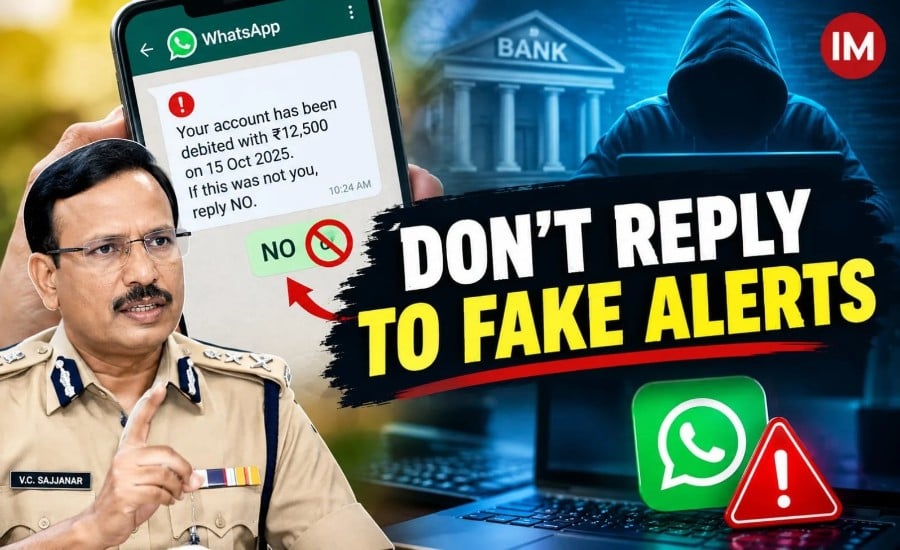
Hyderabad: Hyderabad Police Commissioner V.C. Sajjanar, a 1996-batch IPS officer of the Telangana cadre, has issued a warning about an alleged cyber fraud in which criminals use WhatsApp messages disguised as bank transaction alerts to target unsuspecting users. According to the police warning, victims may be tricked into replying “NO” to messages claiming that money has been debited from their bank accounts.
Sajjanar said the reported fraud does not necessarily involve victims sharing one-time passwords (OTPs) or clicking suspicious links. He described the alleged technique as an “auto-execution file attack” and cited an incident in which a chartered accountant reportedly lost money after responding to a WhatsApp message.
The warning highlights the need to verify unexpected banking alerts through official channels rather than responding to messages from unknown numbers.
The exact technical mechanism behind the reported incidents has not been independently established in the available reporting. Users should therefore distinguish the police advisory from a confirmed explanation of how the alleged attack operates.
How Does the Alleged WhatsApp Scam Work?
According to Sajjanar’s warning, fraudsters use messages designed to create panic by claiming that an unauthorised transaction has taken place.
The recipient is then prompted to reply “NO” if they did not make the transaction. A person who believes money has been stolen may respond quickly without first checking their bank account.
The police commissioner warned that such interactions could expose victims to cybercriminal activity. However, replying to a text message does not, by itself, establish that malware has been installed or that a bank account has been compromised. The precise mechanism would need to be established through technical investigation in each case.
The reported scam pattern
- Step 1: A fake transaction alert arrives. The recipient receives a WhatsApp message from an unfamiliar number claiming that money has been debited from their bank account.
- Step 2: The message asks for a response. The sender instructs the recipient to reply “NO” if the transaction was not authorised.
- Step 3: The recipient responds in panic. Worried about losing money, the user may engage with the unknown sender without verifying the claim.
- Step 4: Fraud is allegedly carried out. In the incidents described in the warning, victims reportedly suffered financial losses. Investigators would need to establish how the fraud was executed and whether malicious software or another technique was involved.
Sajjanar has urged people to remain cautious when they receive unsolicited messages about banking transactions, particularly those that pressure them to respond immediately.
Chartered Accountant Reportedly Targeted
Sajjanar referred to an incident involving a chartered accountant who reportedly lost money in the alleged fraud.
According to reports of his warning, the victim did not share an OTP or click on a suspicious link before suffering the loss. The incident prompted the commissioner to alert the public to the possibility of cybercriminals exploiting messaging platforms to initiate or facilitate financial fraud.
The reported case underscores the importance of investigating how a device and bank account may have been compromised rather than assuming that a single message response necessarily caused the loss.
The police warning does not establish that every unsolicited WhatsApp transaction alert uses the same technique.
Safety Tips: What Should You Do If You Receive a Suspicious Message?
The safest approach is to avoid engaging with an unexpected message that claims your bank account has been debited.
Follow these precautions:
- Do not reply to unknown senders. Avoid responding “YES”, “NO” or with any other message to suspicious banking alerts received from unfamiliar numbers.
- Do not open unexpected attachments. Avoid downloading files or installing applications sent by unknown contacts.
- Do not click suspicious links. Fraudsters may use links that imitate legitimate banking websites or lead to harmful downloads.
- Verify the transaction independently. Open your bank’s official mobile application or internet banking website to check whether the claimed debit actually occurred.
- Contact your bank through official channels. Use the verified customer-care number provided on your bank’s official website, passbook or card.
- Block and report suspicious contacts. Use WhatsApp’s reporting and blocking options when a message appears fraudulent.
- Keep your phone updated. Install operating-system and application security updates, and avoid installing software from untrusted sources.
- Never share confidential banking information. Do not disclose your OTP, PIN, password or other authentication details to someone contacting you unexpectedly.
WhatsApp’s official guidance also advises users to be cautious about suspicious messages, requests for personal information, unfamiliar links and files. Users can review its recommendations through the “WhatsApp Help Centre.”
What If You Have Already Replied ‘NO’?
If you have responded to a suspicious WhatsApp message, do not assume that your bank account has automatically been compromised. Instead, take precautions and check for signs of unauthorised activity.
- Check your bank account immediately through the official banking application or website.
- Contact your bank if you notice an unfamiliar transaction or suspect that your account details have been compromised.
- Review your phone for suspicious activity, including unfamiliar applications, unexpected permission requests or unusual behaviour.
- Do not follow further instructions from the sender or install any software they recommend.
- Report suspected financial fraud immediately through the national cybercrime helpline or reporting portal.
If you downloaded a file, installed an application or granted unusual permissions after receiving the message, tell your bank and the cybercrime authorities. These details may help them assess the risk and determine what protective steps are needed.
How to Report WhatsApp or Banking Fraud in India
The Government of India’s National Cyber Crime Reporting Portal provides a channel for reporting cybercrime, including financial fraud.
If money has been debited fraudulently, act immediately:
- National cybercrime helpline: Call 1930 to report financial cyber fraud.
- Online complaint: Visit the “National Cyber Crime Reporting Portal” (https://www.cybercrime.gov.in/).
- Bank notification: Inform your bank immediately so it can take appropriate steps in response to the unauthorised transaction.
- Preserve evidence: Keep screenshots of the suspicious messages, the sender’s number, bank transaction details and any complaint acknowledgement.
The national helpline and portal are official reporting channels listed by the Indian government’s cybercrime authorities. Prompt reporting may help the relevant authorities and financial institutions take action to limit further losses, although recovery of the money is not guaranteed.
Why Verification Matters More Than a Quick Reply
Fake transaction alerts exploit the urgency people feel when they believe their money is at risk. A message that demands an immediate response can discourage recipients from checking whether the claimed transaction is genuine.
The key precaution is to verify the transaction independently instead of engaging with an unknown sender. An unsolicited WhatsApp message should never be treated as proof that a bank debit has occurred.
Sajjanar’s warning is a reminder to approach unexpected banking messages cautiously, protect sensitive financial information and report suspected fraud without delay.
Read Also: Telangana DGP Warns Police Force Against Online Betting After Two Suicides Linked to Debt